Most VPN users simply browse, stream, message or download files without thinking about incoming traffic. But some use cases, such as BitTorrent, multiplayer gaming, remote access and self-hosted apps, need a way for outside traffic to reach your device.
Port Forwarding provides that capability through your VPN. It can improve P2P performance, make servers reachable from outside and support a range of other advanced uses.
With Trust.Zone, Port Forwarding is available together with a Dedicated IP, giving you a stable VPN IP address that can accept incoming connections on selected ports.
 Adding Port Forwarding gives you more than just an open port. Depending on how you use your VPN, it can provide several practical benefits:
For users who need any of these functions, Port Forwarding can turn a regular VPN connection into something considerably more useful.
One of the biggest reasons to use Port Forwarding with a VPN is better BitTorrent and P2P performance.
Without an available incoming port, your torrent client can still connect to peers, but some peers may not be able to connect back to you. Port Forwarding removes this limitation and gives your client access to more possible connections.
The result can be better peer connectivity, faster download/upload speeds and more efficient seeding. Actual speed still depends on the torrent, available peers and your internet connection, but Port Forwarding gives your torrent client a better opportunity to use the available P2P network.
For users who regularly download, upload or seed torrents through Trust.Zone, this is one of the strongest reasons to add Dedicated IP + Port Forwarding.
If you host a multiplayer game server, other players need a way to reach it. Port Forwarding allows the required incoming connections through your VPN IP.
It can also help in situations where strict NAT causes multiplayer connectivity problems, depending on the game and network configuration.
Another useful benefit is that players connect through your Trust.Zone VPN IP rather than your regular home IP, which is particularly useful when hosting a public or private game server.
Port Forwarding makes it possible to reach a computer or server even when you are on another network.
You can use tools such as RDP, VNC or SSH to access files, manage a computer or administer a server through your Trust.Zone VPN IP.
Instead of being limited to devices on your local network, the service you need can remain reachable while you are travelling, at work or simply away from home.
Port Forwarding can also give you remote access to smart home systems, IoT devices and IP security cameras.
If your smart home application or device needs an incoming connection, a forwarded port allows you to reach it through your Trust.Zone connection when you are away from home.
This can be useful for checking cameras, accessing home automation systems or managing other connected devices remotely.
The same functionality can be useful for Plex, Jellyfin, Nextcloud and other home media or personal cloud services, allowing you to reach content hosted on your own devices from outside your local network.
Developers can use Port Forwarding when an external service needs to reach a local website, development environment, API, webhook or callback URL.
It is also useful for users who run cryptocurrency nodes, including Bitcoin and Lightning Network nodes, where incoming connections can improve peer connectivity and make the node easier to reach from the network.
Trust.Zone offers Port Forwarding as an option for Dedicated IP configurations.
Choose a port in the recommended 5000–65535 range and configure the same port inside the application that needs incoming connections.
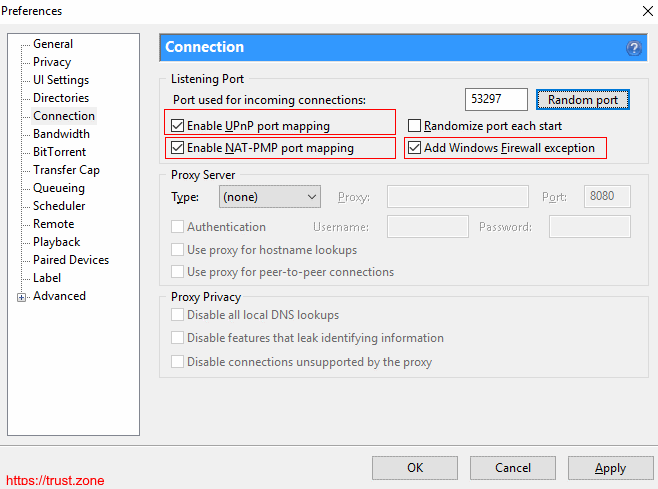
For BitTorrent, enter this number as the incoming or listening port in your torrent client's connection settings (see image below).
For a game server, remote access tool or another service, configure the corresponding application to use the selected port.
Once you connect through your Trust.Zone Dedicated IP with Port Forwarding, incoming connections to that port can reach the application on your device.
Port Forwarding adds extra flexibility to your Trust.Zone Dedicated IP and unlocks use cases that are not possible with a standard VPN connection alone. If you need incoming connections, it is an easy way to extend what your VPN can do without changing your current setup. Trust.Zone extra features start from $0.99/month, making Dedicated IP + Port Forwarding a useful and affordable upgrade for more advanced VPN use.