Do you know that browsers sometimes ignore that you have a VPN and send DNS requests directly to your ISP? That’s called a DNS leak. Some browsers like Firefox and Chrome support WebRTC technology. WebRTC may reveal your real IP address too!
Good news - Trust.Zone VPN protects users against DNS leaks and WebRTC leaks.
The Trust.Zone VPN tool has the 3 most important anti-leak features. Below, we’ll show how to be sure that you are protected every time you use Trust.Zone VPN.
The Kill Switch blocks all outgoing and incoming traffic if the internet connection drops for any reason. So, your real IP address will never be revealed. This feature is extremely important for BitTorrent users and torrent fans because BitTorrent users don’t want their identities and IP addresses exposed to ISPs or government agencies.
Sometimes browsers ignore that you have a VPN set up and send DNS requests directly to your ISP. That’s called a DNS leak. With Trust.Zone VPN you’ll never see a DNS leak!
If you are using Windows 10/8/7, go to the Trust.Zone application's settings tab, set the "DNS leak protection" checkbox to 'ON'. For other operating systems - use the following Trust.Zone DNS servers - 109.236.87.2 and 23.237.56.98. See more instructions here.
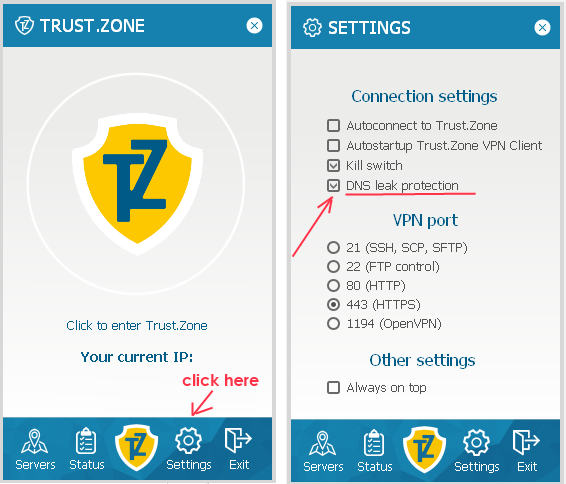
Here is how to check that you have no DNS leaks:
Start Trust.Zone VPN > Connect to a selected server > Open the dnsleaktest.com website and click TEST to see the results. If your real IP address or real location is not shown, you have no leaks.
Some browsers like Firefox and Chrome have implemented WebRTC. WebRTC allows requests to be made to STUN (Session Traversal Utilities for NAT) servers that return the local and public IP addresses for the user. Trust.Zone VPN protects users against WebRTC leaks and keeps users’ online identities hidden. You can easily check Trust.Zone WebRTC protection with the following online tool.
Start Trust.Zone VPN > Connect to a selected server > Go to the www.browserleaks.com/webrtc online tool and see the results.
If you see that your real IP address is revealed, please follow the instructions:
Protect yourself while browsing the web right now - use Trust.Zone VPN! With 3 days of free usage, you have plenty of time to try Trust.Zone VPN without any risk.