Cloudflare WARP is built into Trust.Zone VPN V2 as an additional way to establish a more reliable connection. Most of the time, you can simply connect to Trust.Zone and use the VPN normally. But some ISPs have poor routing, some networks interfere with VPN traffic, and in heavily restricted countries a direct VPN connection may fail completely. This is where WARP can help.
Cloudflare WARP sends internet traffic through Cloudflare's global network using an encrypted connection. Instead of relying only on the route chosen by your ISP, traffic can first reach Cloudflare's network and continue from there. Because Cloudflare operates servers around the world, this alternative route can sometimes be more stable than the path your ISP would normally use.
WARP itself is not the same as a traditional VPN service. It is not designed to provide anonymity or make you appear to be connecting from another country. That distinction is important when WARP is used inside Trust.Zone V2.
Trust.Zone uses WARP as an additional connection option. Your privacy, VPN server location and VPN connection still come from Trust.Zone. WARP simply provides another route to reach that connection when the normal route is problematic.
Normally, your ISP determines how your connection reaches the Trust.Zone VPN server. With WARP enabled, Cloudflare's network can become part of that route. This can help when the problem is not the Trust.Zone server itself, but the network path between you and that server.
In countries with strong internet censorship, a VPN connection may be disrupted before it reaches the VPN server. Russia is one current example. Trust.Zone recommends WARP as one of the options to try when a normal VPN connection cannot be established, together with the correct VPN Region, Handshake Fragmentation and alternative DNS settings.
The same principle can apply in other heavily filtered networks. WARP does not bypass every form of censorship. It simply gives Trust.Zone V2 another possible route when the direct connection is blocked, degraded or unstable.
These two Trust.Zone V2 features solve different problems. Handshake Fragmentation changes how the initial connection data is sent, while Cloudflare WARP changes the route used to reach the network. Depending on the ISP or filtering method, one may help while the other does not. In difficult network conditions, they can also be used together.
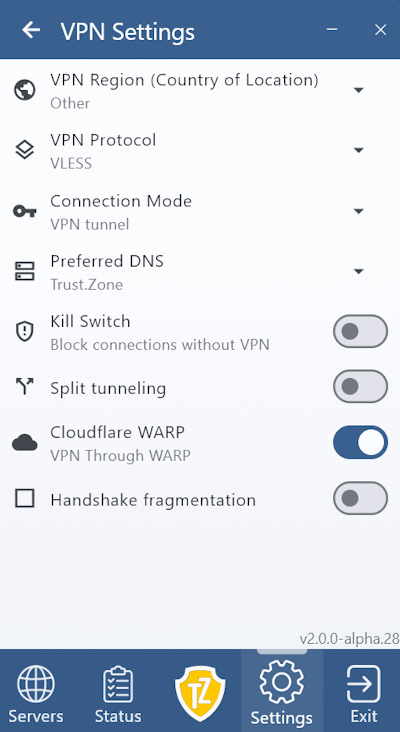 If you are experiencing connection problems, open Trust.Zone VPN V2 and go to:
Enable WARP and try connecting again. For countries such as Russia, China, Iran and other heavily restricted regions, we also recommend selecting the appropriate country under Settings → VPN Settings → VPN Region.
If the connection still cannot be established, changing the VPN Protocol or Preferred DNS provider, or enabling Handshake Fragmentation, may also help.
Cloudflare WARP is best treated as another connection tool inside Trust.Zone VPN V2 — useful when the normal route to the VPN is unreliable or restricted.
What makes this especially useful in Trust.Zone V2 is that WARP is built into the same app. You do not need to install or configure a separate Cloudflare client, switch between different applications, or manage two VPN connections manually. The option can be enabled only when needed and disabled again once the connection works normally. This keeps the setup simple while still giving you another way to connect in difficult network conditions.